
A reliable CCTV system requires a careful balance of preventive care, routine infrastructure audits, and rapid troubleshooting to ensure continuous, 24/7 uptime. Minor issues like a dusty lens, a loose connection, or outdated firmware can quickly cascade into critical recording gaps when footage is needed most.
The essential framework for comprehensive CCTV support and service relies on a structured approach to keep systems fully optimized.

Strategic Service Framework
1. Preventive Maintenance & Video Optimization
Maintaining clear video evidence and preventing camera downtime requires consistent hardware care. A standard check includes:
- Lens Cleaning & Calibration: Removing dust, spiderwebs, and environmental residue to eliminate focus issues and optimize night-vision infrared performance.
- Housing & Mount Audits: Checking physical enclosures, brackets, and outdoor weather seals to prevent water ingress or camera misalignment from high winds.
- Power Supply Testing: Measuring voltage levels across Power over Ethernet (PoE) switches, centralized power distribution units (PDUs), and checking Uninterruptible Power Supply (UPS) batteries to prevent sudden system failures during power fluctuations.
2. Network Infrastructure & Storage Diagnostics
A surveillance system is only as stable as the network and storage backend supporting it.
- Storage Integrity Checks: Running regular health checks (such as S.M.A.R.T. diagnostics) on high-end, surveillance-grade hard drives inside Digital Video Recorders (DVRs) or Network Video Recorders (NVRs) to prevent data loss or frame drops.
- Bandwidth Optimization: Analyzing IP camera bitrates, frame rates, and compression settings (like tweaking $H.264$ versus $H.265$ codecs) to maximize storage retention without choking local network traffic.
- Cabling Integrity: Inspecting structured backbone cabling, patch panels, and RJ45 connections to eliminate intermittent video drops or signal attenuation.
3. Software, Firmware & Security Hardening
Modern video surveillance systems face evolving cybersecurity risks. Protecting the system from unauthorized access involves:
- Firmware Updates: Systematically applying manufacturer patches to cameras and recorders to resolve known bugs and plug critical security vulnerabilities.
- Password and Access Policies: Disabling default manufacturer logins, rotating passwords, and configuring strict user access roles for different tiers of staff.
- Remote Viewing Calibration: Ensuring secure remote access via dedicated mobile apps or desktop client software using VPNs or encrypted ports.
Structured Response & Troubleshooting Flow
When a performance issue occurs—such as a lost camera feed or a recording failure—technicians follow a strict diagnostic sequence to locate and resolve the root cause effectively.
1.Isolate the Fault Layer:Step 1: Physical vs. Network.
Verify if the issue is a complete hardware blackout or a network drop. Check the link lights on the PoE switch or NVR port to see if physical layers are communicating.
2.Test and Verify Power Delivery:Step 2: Voltage & PoE Integrity.
Use a network cable tester or multimeter to check if power is properly reaching the camera. For longer cable runs, ensure line attenuation isn’t dropping the voltage below operational thresholds.
3.Inspect Storage and File Allocation:Step 3: Storage Array Audit.
If video feeds are live but missing historical logs, check the NVR storage configuration. Ensure the hard disks are properly formatted, online, and not stuck in a recursive reboot cycle due to bad sectors.
4.Reconfigure & Update System Parameters:Step 4: Firmware & Software Realignment.
If physical connections and storage are fine, access the device interface to resolve IP conflicts, reset frozen camera modules, or re-apply firmware updates to stabilize communication.
Annual Maintenance Contracts (AMC)
For commercial spaces, high-traffic commercial facilities, and residential infrastructures, establishing a structured Annual Maintenance Contract (AMC) transitions security management from a reactive panic to a predictable, proactive schedule.
| Service Tier Element | Standard Support | Comprehensive AMC |
| Response Time | Ad-hoc / Best Effort | Guaranteed SLA (e.g., 4 to 24 hours) |
| Scheduled Health Audits | Only upon request | Quarterly or Bi-Annual Checkups |
| Emergency Breakdown Visits | Charged per visit | Unlimited or pre-allocated visits included |
| Spare Parts Coverage | Excluded (Billed separately) | Often included or discounted |
| Backup Unit Provisioning | Dependent on availability | Standby temporary equipment provided |
Pro Tip on Storage Retention: Ensure the retention window meets local regulatory mandates or corporate policies. For example, some industries require a strict minimum of 30 to 90 days of continuous, uncompressed backup footage.
Frequent connection drops and video lag in IP camera networks are almost always caused by three major culprits: resource starvation (bandwidth/CPU), power instability, or physical layer degradation.
When a camera drops off or lags, it’s usually because the network or the hardware is failing to handle the high-throughput, constant bitstream required by real-time video.
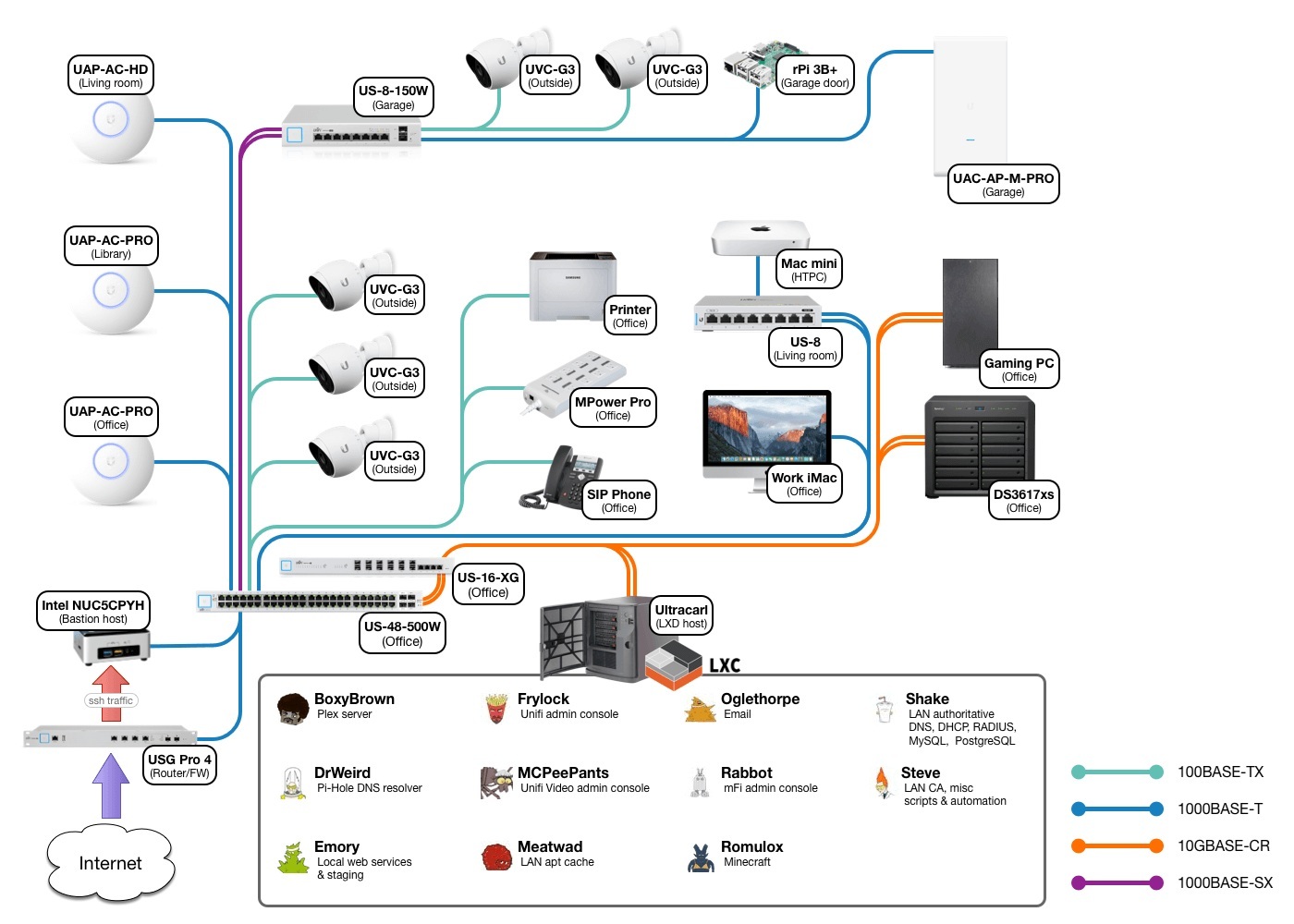
1. Network & Bandwidth Starvation
An IP camera relies on a steady stream of data packet delivery. If the network path is congested or misconfigured, packets drop, resulting in frozen frames, grey screens, or complete connection drops.
Codec Optimization ($H.264$ vs. $H.265$)
- The Issue: High-resolution cameras (4MP, 4K) running on older $H.264$ compression profiles consume massive amounts of bandwidth, choking local network switches.
- The Fix: Switch the camera’s encoding to $H.265$ (HEVC). This cuts bandwidth and storage utilization by roughly 40–50% without sacrificing image quality.
- The Catch: Ensure your NVR or viewing station fully supports $H.265$ hardware decoding; otherwise, you will trade network lag for high CPU usage on the recording unit, causing global playback stuttering.
Bitrate Management (CBR vs. VBR)
- Variable Bitrate (VBR): Lowers bandwidth during static scenes (e.g., an empty hallway at night) but spikes drastically when motion occurs (e.g., a person walking past). These sudden spikes frequently crash underpowered switches or cause packet drops.
- Constant Bitrate (CBR): Locks the camera into a predictable, steady stream. For unstable links or high-traffic areas, switch to CBR and set an upper limit based on resolution:
| Camera Resolution | Recommended Frame Rate (FPS) | Targeted CBR Setting |
| 2 MP (1080p) | 15 FPS | 2,048 Kbps (2 Mbps) |
| 4 MP (2K) | 15 FPS | 4,096 Kbps (4 Mbps) |
| 8 MP (4K) | 12 – 15 FPS | 8,192 Kbps (8 Mbps) |
Note on Frame Rates: Dropping commercial surveillance from 30 FPS to 15 FPS slashes data loads by half, drastically stabilizing network throughput while remaining perfectly fluid for tracking human movement.
2. Power and Physical Layer Degradation
Outdoor cameras are vulnerable to environmental wear, and the copper infrastructure delivering power and data can degrade or shift out of spec over time.
PoE Budget Depletion
- The Issue: A PoE switch might have a total power budget of 60W across 8 ports. If you plug in four standard 5W cameras, it runs perfectly during the day (20W total). However, at night, the cameras activate their Infrared (IR) cut filters and LED illuminators, causing power draw to spike to 12W–15W per camera. The switch overdraws its budget, causing random cameras to reboot or drop connections sequentially.
- The Fix: Calculate the max power consumption (Night Mode specs) for all cameras combined. Ensure it does not exceed 80% of the switch’s total rated PoE budget. Upgrade to a higher-rated PoE+ (802.3at) switch if necessary.
Voltage Drop and Cable Length Limits
- The Issue: Standard Ethernet cabling (Cat5e/Cat6) has a hard physical limit of 100 meters (328 feet). Near or beyond this limit, high-frequency data attenuation and electrical resistance cause severe voltage drops, resulting in intermittent device reboots.
- The Fix: For cable runs approaching or past 90 meters, ensure you are using 100% Solid Bare Copper cabling rather than cheaper Copper Clad Aluminum (CCA). CCA cables exhibit significantly higher electrical resistance, resulting in severe power drops over long distances. For runs beyond 100 meters, deploy a PoE extender or transition to fiber optics with local media converters.
3. Systematic Network Isolation Process
When a specific camera or group of cameras begins dropping, follow this isolation sequence to pinpoint the exact failure point.
1.Run a Continuous Ping Test:Isolate Packet Loss.
Open a command terminal and run a continuous ping to the camera’s IP (ping -t 192.168.1.X). Watch for patterns: regular packet drops every few seconds point to an IP conflict or bad cable; drops only when video loads point to bandwidth choking.
2.Scan for IP Address Conflicts:Network Layer Check.
Disconnect the problematic camera from the network entirely. Run the ping test again. If you still receive a response, another device (like a phone, printer, or laptop) is using that exact same static IP address on the local network. Change the camera’s address.
3.Check Interface Port Statistics:Hardware Error Audit.
Log into your managed network switch or NVR interface. Look at the port connected to the dropping camera. If you see high counts of CRC Errors, alignment errors, or frame drops, the physical path (patch cord, RJ45 termination, or keystones) is damaged and must be re-terminated or replaced.
4.Segregate Traffic via Surveillance VLANs:Broadcast Storm Prevention.
If the network experiences heavy broad broadcast traffic from general office computers, printers, and phones, create a separate Virtual Local Area Network (VLAN) specifically for CCTV traffic. This isolates the heavy video streams from standard office network interference.
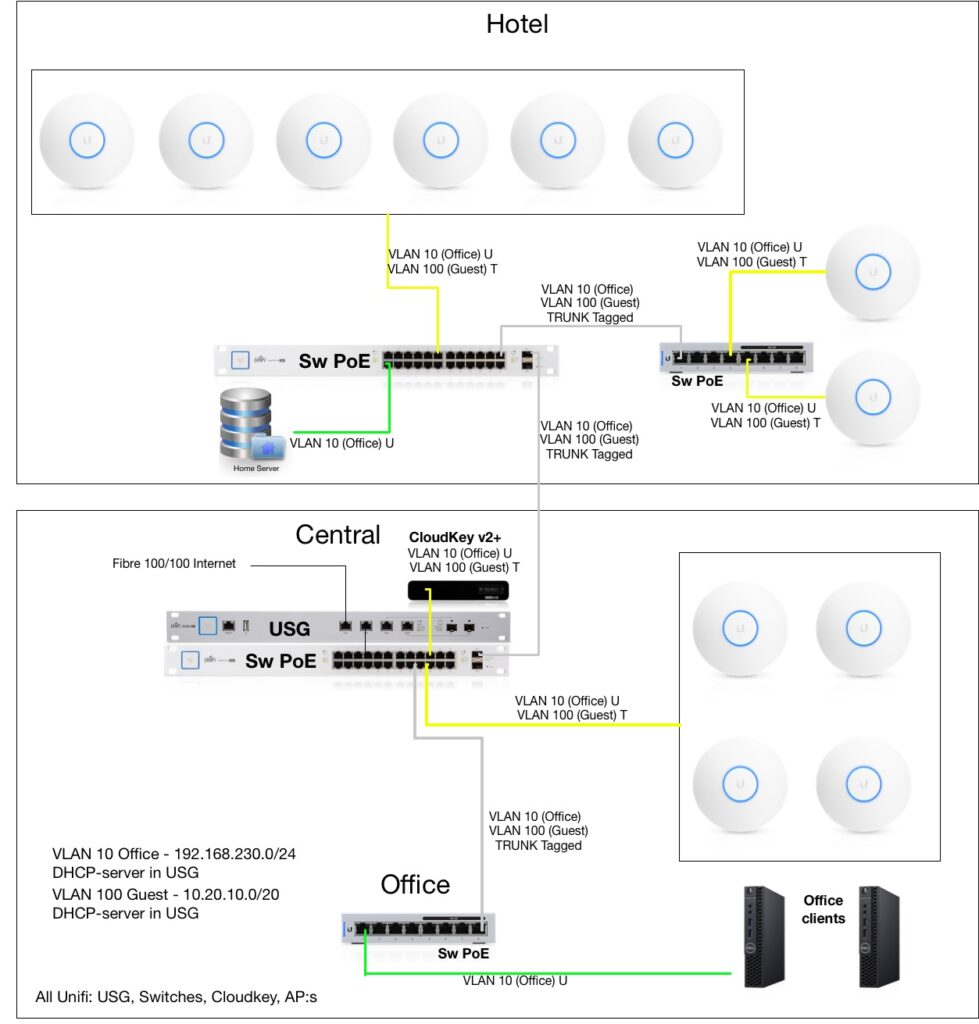
4. Hardware and Subnet Configuration Check
- Subnet Sub-Streaming: When configuring remote viewing software or multi-camera display monitors, make sure the system defaults to the Sub-Stream (lower resolution/bitrate) for multi-camera grid views, and only calls the Main Stream when a single camera is double-clicked into full screen. Forcing a monitor to decode sixteen 4MP main streams simultaneously will instantly crash software or cause heavy video lag.
- ARP Table Flips: If a camera drops every time a specific computer or device turns on, check your router’s Address Resolution Protocol (ARP) tables or DHCP pool reservation to guarantee your static IP assignments for cameras are firmly outside the dynamic DHCP pool scope.