
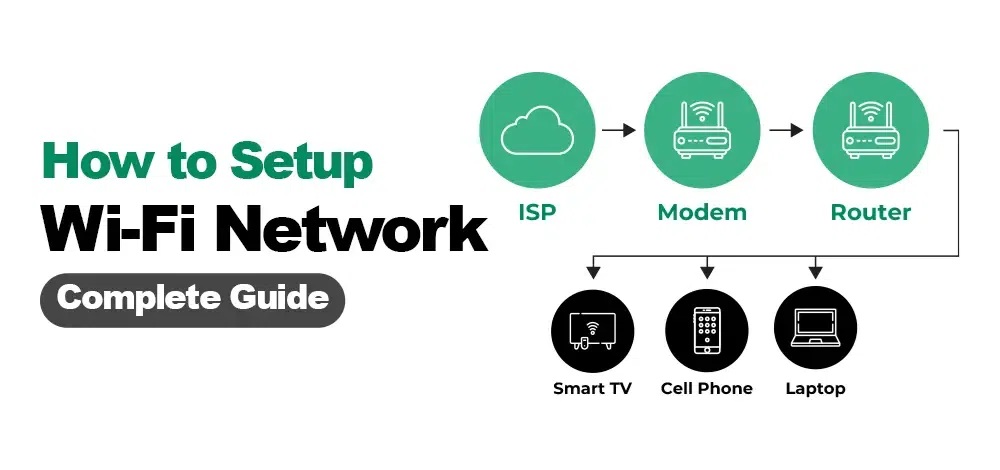
Wi-Fi Office / Home Setup
We tend to treat Wi-Fi like oxygen—we only notice it when it’s missing. But simply having a signal isn’t the same as having a good setup. Whether you are running a business or running a household, how your Wi-Fi is configured directly impacts your security, sanity, and daily productivity.
Here is why a proper office or home Wi-Fi setup actually matters.
1. Professional vs. Personal Performance
The way we use internet at work and home is fundamentally different, and a generic, out-of-the-box router setup rarely handles either well without tweaking.
- In the Office: A weak setup leads to dropped Zoom calls, slow file transfers to local servers, and frustrating bottlenecks when multiple people connect at once. Proper setup ensures Quality of Service (QoS) is configured, which prioritizes critical business traffic (like video conferencing) over background updates.
- At Home: Home networks are now battlefield zones. Between 4K streaming, online gaming, smart home devices (IoT), and remote work, cheap or poorly placed routers cause “dead zones” and constant buffering.
2. Air-Tight Security (The Biggest Risk)
An unconfigured router is an open door. Default passwords (like “admin” or “password”) are widely known, making them easy targets for anyone looking to hijack your bandwidth or intercept data.
- Network Isolation: A proper setup involves creating a Guest Network. At home, this keeps smart TVs and guests away from your personal computers. In an office, it ensures clients can access the internet without seeing your confidential company servers or printers.
- Modern Encryption: Ensuring your network uses WPA3 (or at least WPA2-AES) encryption keeps your data scrambled and safe from local snooping.
3. Coverage and Dead-Zone Elimination
Many people put their router in a corner, under a desk, or inside a cabinet because it looks messy. This completely kills the signal.
A strategic setup factors in physical obstacles:
- Materials matter: Concrete, brick, and solid wood walls drastically cut down Wi-Fi signals.
- Hardware choice: For larger spaces, a single router won’t cut it. A proper setup determines whether you need Access Points (APs) or a Mesh Wi-Fi system to provide seamless roaming from room to room without dropping the connection.
4. Structured Cabling: The Hidden Backbone
People forget that the best Wi-Fi actually relies on wires. For an office or a high-demand home network, “modern data structured cabling” (running high-quality Cat6 or Cat6a ethernet cables from the main switch to your Access Points) ensures that the wireless transmitters themselves are getting maximum, unthrottled speeds. If your backbone wire is weak, your Wi-Fi will be too.
The Bottom Line: A bad Wi-Fi setup costs time in lost productivity and exposes you to unnecessary security risks. A professional, intentional setup means you stop thinking about the internet because it just works.
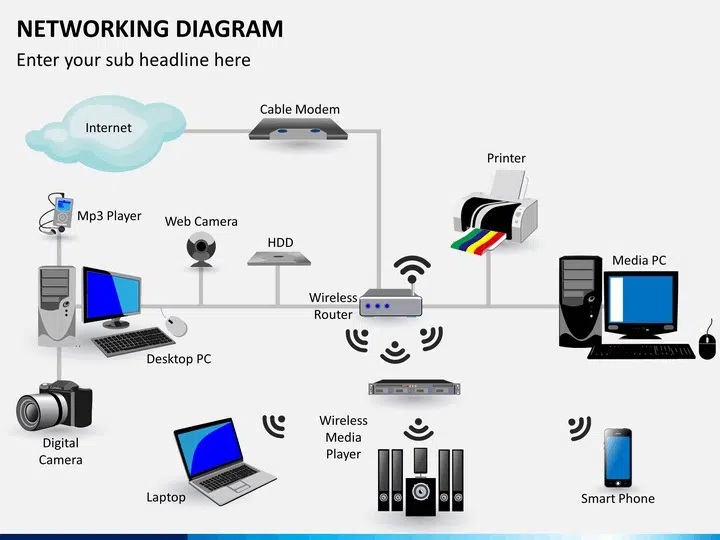
While both Mesh Wi-Fi and traditional Access Points (APs) are designed to expand wireless coverage over a large area, they do it in fundamentally different ways. For an IT professional or a business looking to build a reliable infrastructure, choosing the wrong one can lead to performance bottlenecks or unnecessary management headaches.
Here is the breakdown of how they work, how they differ, and which one is better suited for a business environment.
The Fundamental Difference
1. Traditional Access Points (APs)
In a traditional setup, every single Access Point is hardwired back to a central network switch via Ethernet cables (ideally using structured Cat6 or Cat6a cabling).
- How it works: Because each AP has a dedicated physical line to the main network, it receives full, unthrottled bandwidth directly from the source. The APs broadcast the same network name (SSID), allowing users to move around, but the heavy lifting is done by the wired backbone.
- Analogy: Think of it like a city subway system where every station has its own dedicated track leading straight to the main terminal.
2. Mesh Wi-Fi Systems
Mesh networks were originally designed to eliminate the need for running wires. You have one main router connected to the modem, and then multiple “satellite” nodes placed throughout the building.
- How it works: Only the main node is wired. The other nodes connect to each other wirelessly, passing the internet signal from one node to the next like a bucket brigade. They use a portion of their wireless capacity (known as wireless backhaul) just to talk to each other.
- Analogy: Think of it like a chain of people passing a message down a long line by shouting to one another.
Key Comparisons
| Feature | Traditional Access Points (APs) | Mesh Wi-Fi Systems |
| Backbone Connection | Wired: Every AP requires an Ethernet cable. | Wireless: Nodes connect to each other over the air. |
| Speed & Performance | Maximum & Consistent: No signal degradation between APs. | Degrades with Distance: Each “hop” between wireless nodes can cut throughput. |
| Capacity (User Load) | High: Built to handle dozens or hundreds of concurrent devices. | Moderate: Better suited for residential or light commercial loads. |
| Installation | Complex: Requires running physical data cables through walls/ceilings. | Plug-and-Play: Very easy to set up via a smartphone app. |
| Central Management | Advanced: Managed via a centralized controller (e.g., Cisco, Ubiquiti, Aruba) for deep configuration. | Simple: Usually managed via a basic app with fewer granular controls. |
Which is Better for a Business?
For almost all commercial environments, Traditional Access Points are the superior and recommended choice. Here is why:
Why Access Points Win for Business:
- Uncompromised Reliability: In an office, network downtime or slow speeds cost money. Because APs rely on structured cabling, they aren’t susceptible to the wireless interference, thick concrete walls, or distance degradation that plague wireless mesh nodes.
- Heavy Device Density: Offices are packed with laptops, smartphones, VoIP phones, wireless printers, and smart devices. Enterprise-grade APs are engineered with powerful processors to handle high connection density without dropping users.
- Power over Ethernet (PoE): Traditional APs are usually powered directly through the data cable using a PoE switch. This means you can mount them cleanly on ceilings or walls where there are no electrical outlets. Mesh nodes usually require being plugged into a standard wall outlet.
- Advanced Security and VLANs: Business networks require strict separation. With professional APs, you can easily broadcast multiple separate networks (e.g., Corporate, Guest, IoT, CCTV) on different VLANs from the exact same hardware, keeping sensitive data completely isolated.
When is Mesh Acceptable for a Business?
Mesh Wi-Fi is rarely ideal for a primary business infrastructure, but it can be used as a stopgap or in very specific scenarios:
- Micro-businesses or retail shops operating out of a small, single-room or open-concept space with fewer than 10-15 users.
- Rental properties or historical buildings where drilling holes and running structured Ethernet cabling is legally or physically impossible.
The Verdict
If you are setting up an office where productivity, security, and scalability matter, invest in traditional Access Points paired with a solid structured cabling backbone. It requires more effort upfront to install the wires, but it delivers a rock-solid, enterprise-grade network that won’t choke under pressure. Mesh is best left for home environments or small retail spots where convenience outweighs raw performance.